

改变the Execution Order of Processes
 MartinLiebig
Administrator, Moderator, Employee, RapidMiner Certified Analyst, RapidMiner Certified Expert, University ProfessorPosts:3,421
MartinLiebig
Administrator, Moderator, Employee, RapidMiner Certified Analyst, RapidMiner Certified Expert, University ProfessorPosts:3,421 RM Data Scientist
Question
RapidMiner is always executing one operator at a time. How can I change the order?
Answer
Changing the exectution order is usually not necessary. There are only a few cases where you need to do it:
- An operator needs the result of a former operator which cannot or should not be connected (e.g. Remember or Extract Macro)
- You would like to inspect the result of one operation first (using e.g. breakpoints)
To do this you can click on the small blue icon on the upper right most edge of the Process Panel
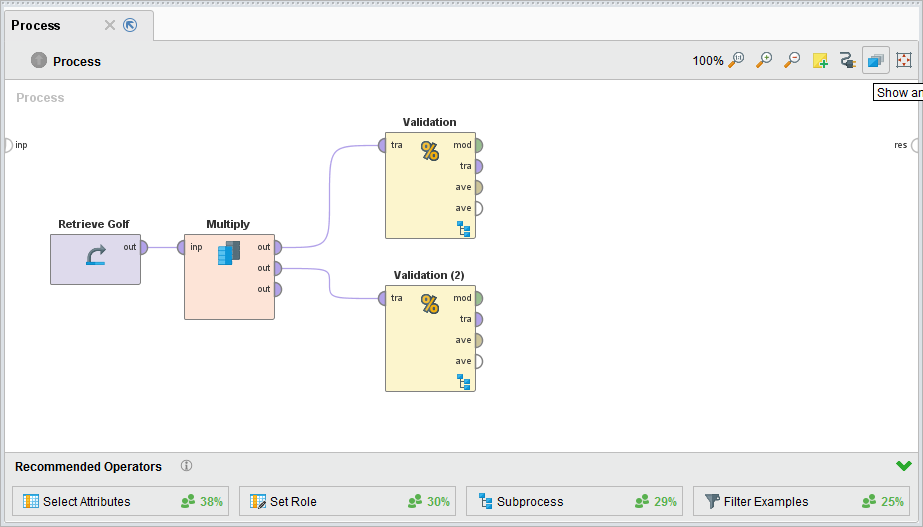
Once you clicked on it you see the real execution ordering. You can not right click on the numbers

to make the execution of the operator as early as possible.
You can also change the ordering manually by clicking on the first operator (here: Multiply) and then on the operator which should be excecuted next (here: Validation).
- Sr. Director Data Solutions, Altair RapidMiner -
多特蒙德,通用电气rmany
多特蒙德,通用电气rmany
Tagged:



4

评论
多特蒙德,通用电气rmany
多特蒙德,通用电气rmany